

The internet is full of millions of websites, but how many of them do you actually use? Most people regularly visit the same few platforms for social media, entertainment, shopping, news, and communication. However, there are hundreds of incredibly useful websites that can save you time, help you learn something new, solve everyday problems, or simply make your digital life easier.
Whether you are a student, professional, content creator, traveler, tech enthusiast, or someone who simply spends a lot of time online, having a collection of useful websites bookmarked can be surprisingly helpful.
In this article, we have selected 10 useful websites worth bookmarking right now. Some can help you find information, some can make everyday tasks easier, and others are simply fun and interesting to explore.
1. Google — Search Almost Anything
Google is probably one of the most familiar websites on the internet, but many people use only a small portion of what it can do.
Besides searching for websites, Google can quickly provide information such as weather forecasts, currency conversions, calculations, definitions, translations, sports scores, flight information, maps, and much more.
For example, instead of opening a calculator app, you can simply type a mathematical calculation into Google. You can also search for phrases such as “100 USD to INR” or “weather today” and get useful information immediately.
Why bookmark it?
Because Google can act as a quick gateway to almost anything you need on the internet.
2. Canva — Create Designs Easily
You don’t need to be a professional graphic designer to create attractive designs.
Canva is an online design platform that provides templates for social media posts, presentations, posters, resumes, invitations, thumbnails, certificates, and many other types of visual content.
Its simple drag-and-drop interface makes it accessible even to beginners. You can start with a template and customize the text, images, fonts, and layout according to your needs.
Students can use it for presentations and projects, while creators can use it for thumbnails, Instagram posts, videos, and other content.
Why bookmark it?
It’s an extremely convenient design tool when you need to create something quickly.
3. Remove.bg — Remove Image Backgrounds
Have you ever wanted to remove the background from a photograph but didn’t know how to use Photoshop?
Remove.bg can make that process much easier. The website is designed to automatically remove backgrounds from images, allowing you to create transparent-background images with minimal effort.
This can be particularly useful for product photos, profile pictures, posters, thumbnails, presentations, and social media designs.
Instead of spending several minutes manually selecting objects, you can upload an image and let the website handle the background removal.
Why bookmark it?
It’s a handy tool whenever you need a clean image without its original background.
4. Google Drive — Keep Your Files Accessible
Losing an important file because your computer crashed can be frustrating.
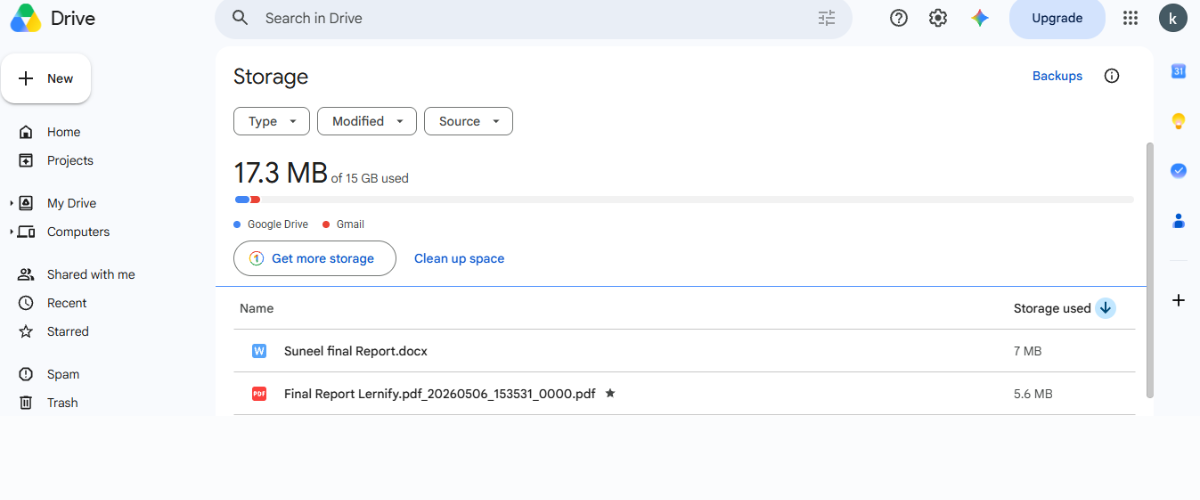
Google Drive provides cloud storage that allows you to store and access files online. You can upload documents, images, videos, PDFs, presentations, and other files and access them from compatible devices.
It can also be useful for sharing files with other people. Instead of sending large attachments repeatedly, you can share access to a file stored in the cloud.
For students and professionals, cloud storage can also provide a convenient way to keep important documents organized.
Why bookmark it?
Because having important files safely stored online can make working across multiple devices much easier.
5. Wikipedia — Learn About Almost Anything
Sometimes you want a quick explanation of a topic without reading a long textbook.
Wikipedia can be a useful starting point for learning about history, science, technology, geography, famous people, countries, companies, inventions, and countless other subjects.
One interesting way to use Wikipedia is to explore links within an article. You might start by reading about a famous invention and end up discovering information about its inventor, historical period, related technologies, and other events.
However, for academic or professional work, it’s always a good idea to verify important information using reliable primary or authoritative sources.
Why bookmark it?
It’s an excellent starting point when you’re curious about a new topic.
6. Speedtest — Check Your Internet Speed
Is your internet suddenly feeling slow?
Before blaming your router, you can check your connection speed using an internet speed-testing website such as Speedtest.
It can help you understand how quickly your connection is downloading and uploading data and can provide information about network latency.
This can be useful when troubleshooting slow browsing, video buffering, online gaming problems, or unstable connections.
For example, if your internet plan promises a particular speed but your connection consistently performs significantly below that level, the results can give you useful information when discussing the problem with your internet provider.
Why bookmark it?
Because you never know when you’ll need to quickly check whether your internet connection is actually performing properly.
7. Google Translate — Break Language Barriers
The internet connects people from different countries, but language differences can sometimes make communication difficult.
Google Translate can help translate words, sentences, and longer pieces of text between numerous languages.
It can be particularly useful while traveling, reading foreign-language content, communicating with someone who speaks another language, or trying to understand an unfamiliar word.
Translation tools are not perfect, especially for complicated sentences, slang, cultural expressions, or highly technical writing. Still, they can be extremely useful for everyday situations.
Why bookmark it?
Because you may suddenly need to understand a language you don’t speak.
8. Internet Archive — Explore the Digital Past
The internet changes constantly. Websites disappear, pages are redesigned, and information that was once available can sometimes become difficult to find.
The Internet Archive is a fascinating resource for exploring older versions of websites and accessing a huge collection of archived digital material.
Its Wayback Machine allows users to look at historical snapshots of websites that were captured at different points in time.
This can be useful for researchers, journalists, students, developers, and curious internet users who want to see how websites looked years ago.
It’s also a fascinating reminder of how dramatically the internet has changed.
Why bookmark it?
Because the website you see today may look completely different tomorrow.
9. Trello — Organize Your Tasks
Do you sometimes have so many tasks that you don’t know where to start?
Trello is a visual organization tool that can help you manage tasks and projects using boards, lists, and cards.
You can create boards for college assignments, personal projects, content planning, travel plans, work tasks, or almost anything else.
For example, you could create three lists:
To Do → In Progress → Completed
Then move tasks between the lists as you work on them.
This simple visual approach can make complicated projects easier to understand.
Why bookmark it?
Because organizing your tasks can help turn a confusing workload into a clear plan.
10. Unsplash — Find Beautiful Free Images
Finding high-quality images for a presentation, blog post, social media design, or personal project can be difficult.
Unsplash offers a large collection of photographs that can be useful for creative and visual projects, subject to the applicable license terms.
You can search for images based on topics such as technology, nature, business, travel, food, architecture, people, and many other categories.
The website can be especially useful for bloggers, designers, students, marketers, and content creators looking for visual inspiration.
Before using an image commercially or in a particular project, always check the current licensing conditions and any applicable restrictions.
Why bookmark it?
Because a great image can make an ordinary project look much more professional.
Why You Should Bookmark Useful Websites
The biggest advantage of bookmarking useful websites isn’t simply convenience. It’s about reducing the time you spend searching for the same resources repeatedly.
Think about how often you search for a tool you’ve previously used but can’t remember the name of. You may spend several minutes searching Google before finally finding it again.
Bookmarks solve that problem.
You can create folders in your browser such as:
- Study
- Work
- Design
- Technology
- Travel
- Productivity
- Entertainment
- Useful Tools
Then save your favorite websites in the appropriate folder.
Over time, your browser can become a personal collection of resources that you can access within seconds.
The Internet Has More Useful Websites Than You Think
One of the most interesting things about the internet is that there is almost always a website for a problem you are trying to solve.
Need to compress a file? There are websites for that.
Want to learn a new skill? There are websites for that.
Need to organize your tasks? There are websites for that.
Want to create a design? There are websites for that.
Need to understand something complicated? There are websites for that too.
The trick is discovering these resources and remembering them when you actually need them.
That’s why creating your own collection of useful bookmarks can be surprisingly valuable.
Final Thoughts
The internet isn’t just a place for social media, videos, shopping, and entertainment. It is also one of the largest collections of tools and information ever created.
From designing graphics and removing image backgrounds to organizing tasks, checking internet speed, learning new subjects, and exploring old versions of websites, the right online tools can make everyday tasks significantly easier.
You don’t necessarily need to bookmark hundreds of websites. Start with the ones that are genuinely useful to you and organize them into a few simple folders.
And remember: a useful website is only useful if you can find it when you need it.
So, pick your favorites from this list, bookmark them, and start building your own personal collection of the internet’s most useful resources.
Frequently Asked Questions
1. What are useful websites?
Useful websites are online platforms that help you complete tasks, find information, learn new things, solve problems, stay organized, or make everyday activities easier.
2. How many websites should I bookmark?
There is no fixed number. Bookmark websites that you actually use regularly. Organizing them into folders can also make it easier to find them later.
3. Are these websites free to use?
Many of the websites mentioned in this article offer free features, although some may also provide optional paid features, plans, or services. Always check the individual website for its current pricing and terms.
4. Can students use these websites?
Yes. Students can use several of these resources for research, presentations, organization, language assistance, image resources, and everyday digital tasks.
5. What is the best way to organize bookmarks?
A simple approach is to create folders based on purpose, such as Study, Work, Design, Productivity, Technology, and Entertainment. This makes frequently used resources much easier to find.